Communicating data with Infographics

Infographics: Pictures That Tell A Story…

What is an Infographic?

The term Infographic is a portmanteau of two terms, “Information” and “Graphics,” and describes the visual representation of data. Infographics help communicate complex information in a digestible manner, as they creatively present data in an understandable and engaging format.
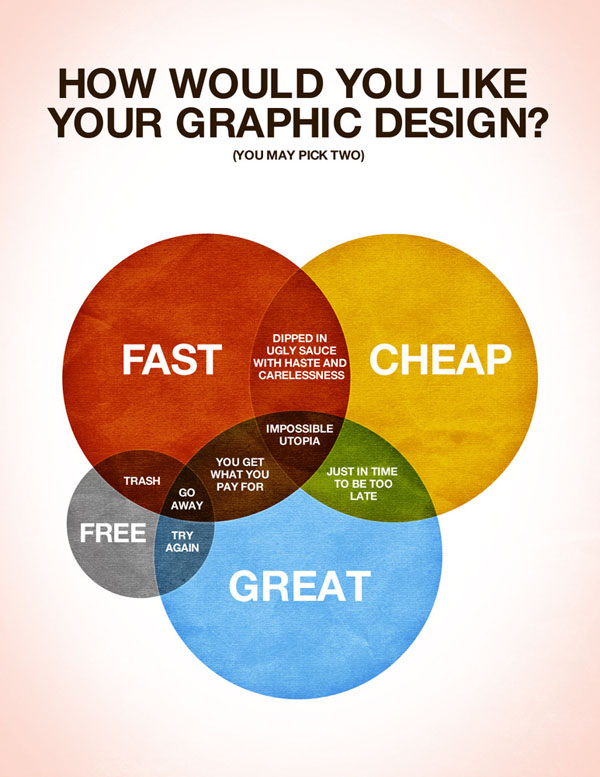
from www.DesignModo.comAs web users, with our diminishing attention spans, we’re inexorably drawn to these shiny, brightly colored messages with small, relevant, clearly-displayed nuggets of information. They’re straight to the point, usually factually interesting and often give you a wake-up call as to what those statistics really mean.  Here are some examples to fire up your i-graph engines…

Example: An Infographic that’s all about YOU

Intel’s “What About Me?”

Intel’s What About Me? is an automatic infographic generator that connects to your own Twitter, Facebook and YouTube accounts to create a profile infographic about you.

Social media users know that discovery is half the fun. With What about Me? you can capture a snapshot of your social media life and create your own colorful image, full of clues and facts about one of the most fascinating subjects in the world — YOU!

The chipmaker’s new “What About Me?” app culls info from your Facebook, Twitter and YouTube profiles to crank out a data visualization of your composite social media profile.

For instance, there’s a graphic that looks like a flower that tracks your interests based on what you tweet and write status updates about. There’s also a record of your most popular post ever and your most popular pic, your ratio of self-created updates vs. found information and “likes.”

More great Infographic examples

Free Online Tools For Creating Infographics

  • Hohli

    Hohli is an intuitive, simple online chart maker. It’s incredibly easy to pick your chart type, add some data, vary the sizes and colors and see the finished chart.

    information graphics

    Creately

    Creately lets you design easy-to-make diagrams and flow charts. You can choose from a number of purpose-designed diagram types and quickly add your data to make your own chart. The end result looks very professional.

    information graphics

    New York Times

    New York Times’ Visualization Lab lets you use statistics from recent NYTimes articles to create visualizations in various formats. You can also see other people’s visualizations and see how other people choose to display the same data.

    data graphics

    Many Eyes

    Many Eyes lets you upload your own data or use data already stored on the site. The visualizations themselves are well-designed and very professional-looking. This is definitely the easiest way to use your own data for online visualizations.

    data graphics

    Google Public Data

    Google Public Data lets you easily take public data and transform it into an infographic of your choice. These beautiful, colorful graphics simplify and communicate the data perfectly.

    data graphics

    Wordle

    You may have seen my earlier post on Wordle, which lets you create word visualizations using text you enter. There are plenty of interesting designs to choose from. Enter whole books, short passages or see what other people have used. In this example, we can see the US constitution visualised.

    Free Software For Creating Infographics

    Tableau

    Tableau is a free Windows-only software for creating visualizations. As you can see, these impressive graphs are colorful and quite unique.

Great tutorials on infographic creation:

Pinteresting

Design. Design. Design…

It’s the secret behind the success of Pinterest.

Check out Sahil Lavingia’s perspective on the design genius behind wildly popular stuff-sharing phenomenon, Pinterest: http://www.fastcodesign.com/1669189/pinterests-founding-designer-shares-his-dead-simple-design-philosophy  

The bottom line?

Design isn’t just wire frames or visual style; it’s about the product as a whole.

Here’s my favorite part:

“…Design should be considered a facet of everything you do, as well as a means of improving your business. Imagine if your site were to slow down. What would you do? You’d try to make it faster, or find an engineer that could. You’d make a conscious design decision to make your site quicker to use, because you understand that doing so will make your offerings more accessible and user-friendly. Apply that principle of improvement to everything else.”

Lavingia is the designer/founder/CEO of Gumroad, and was previously on the founding team of Pinterest.

Maven, ninja, or guru. Which one are you?

Attention-grabbing Job Seekers…

You know the job market has become increasingly competitive. A standard resume or CV won’t really cut it these days. To stand out, there are ever-more random lengths people will go to in order to secure a job or even get noticed by potential employers. Take a look at some of the best job applications around.

http://finance.yahoo.com/news/remarkable-hiring-stories.html

Sticky Note Mind Maps

Need help solving a dilemma? Want ideas for a better way to do things? Got a new project that needs structure? Try Sticky Note Mind Mapping!

Psychologist Tony Buzan developed “Mind Mapping” as a tool for thinking ‘laterally’ – it’s a type of visual brainstorming that’s based on a central idea written in the center of a page (or wall), then related ideas are added on branches that radiate from this central idea. Because of this structure, it requires all ideas to be connected to the center and allows connection to one another, providing opportunity for convergent thinking, fitting ideas together, as well as thinking up new ideas. Sticky note Mind mapping allows you to ‘storm and sort’ your ideas.

Steps:
1. Find a large section of blank wall or whiteboard and lots of sticky notes and markers. Using a variety of sticky note colors and sizes, simply jot down all your thoughts on the sticky notes – with each new thought or concept on a new sticky note.
2. As you write down your thoughts on the sticky notes, stick them up on the wall or whiteboard – you can group them into similar themes as you stick them up, but the best thing about using sticky notes for this map is that you can move them around as your thoughts develop.
3. Once you’ve jotted down all your thoughts and stuck them on the wall, look for branches and connections between the ideas. What’s missing? What are the recurring ideas? Where are the connections?
4. When you’ve sorted the sticky notes into a map that makes the most sense of your thoughts, you can either take a photo of it as your record, or draw it as a real mind map.

Considerations:
• Don’t think too much about structure as you’re preparing the map – just let it flow as you work through the process
• Work through it quickly to keep up the flow of ideas
• Keep the points brief – you can expand them later
• Use sketches, images and pictures (if you can) – it makes it easier to remember and more personal, but make sure it doesn’t slow down the brainstorming flow. ClipArt is great for this!
• Once you’ve got it all down, stand back and take a look. What’s missing? What are the recurring ideas? Where are the connections?
• Continue! This mind map is a work in progress.

Have you tried a sticky note mind map? If so, let us know how it helped you!

Learning Design That Makes You Shine

Tonight I read an online article that stopped me in my tracks. Rather than try to capture the essence of author Barbara Findlay Schenck’s brilliance by recapitulating it in my own words, I’m just going to re-publish the article.

It’s that good.

First, I’ll share my 6-word elevator speech with you: “Learning Design That Makes You Shine.” Now, on to the good stuff, then it’s your turn…

Want a Loan? A Sale? A Job?
By Barbara Findlay Schenck

When Brad Newman introduced himself as an actrepreneur, I was hooked. Everything about his title told me he had information I wanted to hear. Over a few additional seconds, I learned that this actor and entrepreneur is the founder of Zentainment, “a socially conscious media company committed to growing brands that encourage you to dream big and live a sustainable life.” From there, a longer conversation and a business relationship followed, all spurred by an attention-getting introduction that took just moments to deliver.

The elevator pitch rides into the speed-dating era
Today’s economic environment has turned job fairs, trade shows, networking events and even sidewalk sales into buyers’ markets where only those with quick, compelling pitches survive.

In the 1990s, high-tech entrepreneurs named these short spiels “elevator pitches” because they could be conveyed during an elevator ride. The tech bubble ballooned and burst (and ballooned again), but elevator pitches are here to stay. Everyone whether seeking employment, sales or profitable business associations needs one.

Is your introduction ready to roll?
“So, what do you do?”

Those five words are on the minds of everyone you meet, whether in person or online. Brad Newman’s introduction helps provide a formula that can assist you in preparing your answer and attracting attention from those you aim to impress:

Describe yourself in five words or less. Use a distinctive title or phrase that makes people think, “This sounds interesting” or “This is what I’m looking for.” Consider the difference between “I’m a copywriter” and “I turn browsers into buyers.” Or, in Newman’s case, between “social media entrepreneur” and “actrepreneur.”

Explain what you do in one sentence. After introducing yourself, introduce your offerings. “Our name combines the words Zen and entertainment, which stakes out our media space,” Newman says. “We’re a media company that focuses on socially conscious content. That definition tells what Zentainment is and rules out what it isn’t.” Work on a similarly specific description for your business.

Define your target audience. “Our market is comprised of 30- to 49-year-olds who care about socially conscious living,” Newman says. “By defining our market in that way, people immediately know whether our business is for them.” In other words, Zentainment isn’t trying to be all things to all people. It’s focused on a specific target audience, which is a key to success in today’s crowded business environment.

Communicate your vision. “We’re committed to growing brands that encourage you to dream big and live a sustainable life, whether they’re our own brands or ones for which we consult and serve as producers,” Newman says. “Our vision is clear enough to keep us focused and broad enough to make us adaptive to the opportunities of a changing market and media world.” It’s also compelling enough to attract a growing contingent of Zentainment consumers and business clients. What does your business stand for? What attracts your customers and their loyalty? Your answers can serve as a magnet for growth.

Practice, practice, practice. Create a script that conveys who you are, what you offer, your market, and the distinctive benefits you provide. Edit until you can introduce yourself and your business in less than a minute, which is how long most prospects will give you to win their interest.

Shrink your introduction even further so you can tell your story in 20 words or less. That’s how much space you have in most marketing materials and online presentations, whether on your own site, on social media sites, or on sites that link to your home page. If you’re thinking, “Twenty words? You’ve got to be kidding,” scroll back to the start of this column. That’s exactly what Brad Newman used to get my interest.

Barbara Findlay Schenck is a small-business strategist, the author of “Small Business Marketing for Dummies” and the co-author of “Branding for Dummies,” “Selling Your Business for Dummies” and “Business Plans Kit for Dummies.”