How often throughout your day do you come across an acronym that makes no sense to you? Wouldn’t it be great if you could get the 411 FYI on that mysterious jumble of letters?
Well, wonder no more…
What a great tool!
A man sat at a metro station in Washington, DC and started to play the violin; it was a cold January morning. He played six Bach pieces for about 45 minutes. During that time, since it was rush hour, it was calculated that thousand of people went through the station, most of them on their way to work. Three minutes went by and a middle-aged man noticed there was musician playing. He slowed his pace and stopped for a few seconds and then hurried up to meet his schedule.
A minute later, the violinist received his first dollar tip: a woman threw the money in the till and without stopping continued to walk.
A few minutes later, someone leaned against the wall to listen to him, but the man looked at his watch and started to walk again. Clearly he was late for work.
The one who paid the most attention was a 3 year old boy. His mother tagged him along, hurried but the kid stopped to look at the violinist. Finally the mother pushed hard and the child continued to walk turning his head all the time. This action was repeated by several other children. All the parents, without exception, forced them to move on.
In the 45 minutes the musician played, only 6 people stopped and stayed for a while. About 20 gave him money but continued to walk their normal pace. He collected $32. When he finished playing and silence took over, no one noticed it. No one applauded, nor was there any recognition.
No one knew this, but the violinist was Joshua Bell, one of the best musicians in the world. He played one of the most intricate pieces ever written, with a violin worth 3.5 million dollars.
Two days before his playing in the subway, Joshua Bell sold out at a theater in Boston and the seats average $100.
This is a real story. Joshua Bell playing incognito in the metro station was organized by the Washington Post as part of an social experiment about perception, taste and priorities of people. The outlines were: in a commonplace environment at an inappropriate hour: Do we perceive beauty? Do we stop to appreciate it? Do we recognize the talent in an unexpected context?
One of the possible conclusions from this experience could be:
If we do not have a moment to stop and listen to one of the best musicians in the world playing the best music ever written, how many other things are we missing?
– From The Effective Club
Everyone loves free stuff. Here are a few of my favorite (free) things:
Free Teleconferencing: Use freeconference.com to set up telephone conferences with up to 150 people. No charge to you. Callers only pay the long distance charges to join the call.
Free Graphic Design Software: Use gimp.com to do your photoshopping – but free! The tool is as intuitive as Adobe Photoshop, and nearly as robust.
Free leadership and training ideas: Yes, here! Check susanhendrich.wordpress.com often for handy tips and tricks that help you succeed in the leadership and training arenas.
More freebies soon!
Thanks,
Susan
Ever get one of those “please review attached document” emails? Then you open the attachment and it’s a “pdf” file. You scratch your head and wonder, “How do I mark up this document? It’s not easy like Word!” Well the pain is about to end, my friend. Read on to learn how to review documents using Adobe Acrobat’s commenting and mark-up features. Here’s how:
1. Save the file you want to review to your desktop
2. Make your comments and mark-ups
a. Comments
The commenting tools in Acrobat mimic real-life markup tools such as sticky notes, highlighters and markers. To display the comment and markup tools:
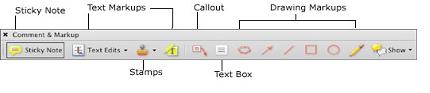
Figure 1: Acrobat 8.0 commenting tools are very much like real-life drawing and markup tools. Except cleaner.

Figure 2 Acrobat 7.0 offers similar features.
The Sticky Note (called ‘Add a Note’ in earlier Acrobat versions) tool is fairly intuitive: Select the tool, click in the PDF and type in the digital note that appears at the edge of the PDF page. You can move notes around the page by clicking on the top outline bar of each individual note.
b. Mark-ups
Use Comments > Text Edits > Indicate Text Edits to mark desired changes in the text. When using the Text Edits tool (figure 3), just pretend that you’re typing corrections, because in reality nothing changes. You’re not actually changing text in the PDF-you’re only indicating where changes should be made. To indicate that you wish to delete text, highlight the text and hit Delete or Backspace. The text is marked with a strikethrough. To replace text, highlight text and type the new text. Acrobat strikes through the text and populates the accompanying note with your new text. To insert text, click the PDF to create an insertion point and type the new text. The added text is displayed in the associated note. The Highlight Text tool lets you call attention to selected text, and the associated note holds your comments. To delete any comment, select the comment’s icon on the PDF and hit the Delete key.

TIP: To see all of your changes, including comments and text edits, select Comments > Show Comments & Markups > Open All Pop-ups:
3. Save your file, then send it off to your editor.
More Help
Look to Acrobat’s Help Guide for more information on using the Comment and Review tools. Acrobat User Community (www.acrobatusers.com) is a good resource on wide range of Acrobat topics.

What does it take to be a champion? Here are excerpts from just a few everyday heroes who outta know:
Jim Loy: “Most great athletes will tell you that to get where they are took practice, practice, practice, work, work, work.”
Zig Ziglar: “Learn the importance of:
- Replacing bad habits with good habits.
- Seeing the best in people.
- Taking time to reflect.
- Meeting challenges with assurance.
- Greeting others with confidence and enthusiasm.
- Balanced living.”
Stephen Downes: “Decide what’s worth doing. If you don’t decide what is worth doing, someone will decide for you, and at some point in your life you will realize that you haven’t done what is worth doing at all. So spend some time, today, thinking about what is worth doing. You can change your mind tomorrow. But begin, at least, to guide yourself somewhere.”
The Philadelphia Phillies proved tonight that they can do all of the above. Congratulations, Phils!
2008 World Champions!

